Compatibility
Minecraft: Java Edition
Platforms
Supported environments


Links
Creators
Details
Licensed ARR
Published 7 months ago
Updated 13 hours ago
How to Install:
- Download the mod.
- Place it in your
modsfolder. - Launch the game.
- Add your friends names via
/highlighted-friends. - Enjoy!
What does the mod do?
-
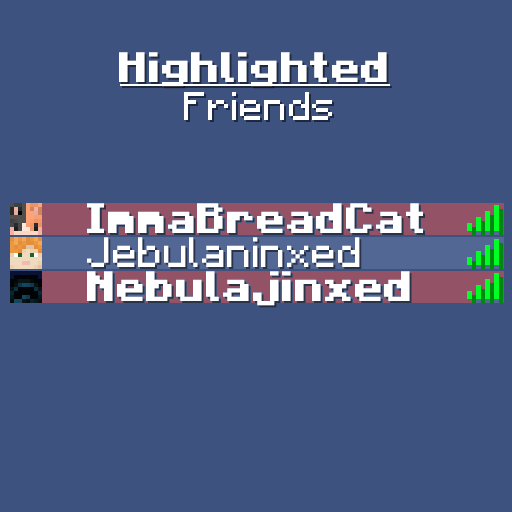
The mod allows you to change the style of player names in the Tab list (Bold, Italic, Underlined)
-
Allows you to customise the background color behind your friends' names.
-
Saves player's via UUID.
-
Adjusts the name if changed.
-
Allows multiple groups so you can make "teams" in your Tab list!